AI Grading panel
The AI Grading panel is the first tab on the right side of the Color tab — a brand-new feature in Colourlab Ai 4 that lets you build looks by chatting directly with the color-grading agent. Instead of picking a reference and matching to it, you describe what you want, and the agent proposes looks for you to preview.
The chat
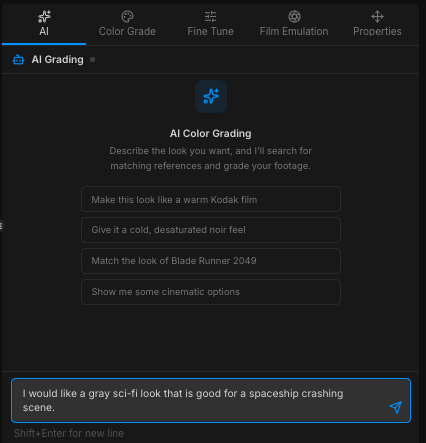
What you see in the panel is a traditional chat interface. Below the message list is a text field. Type whatever describes the look you're after — as loose or as specific as you like:
- Emotion — intimate, anxious, joyful, melancholy.
- Color cues — amber, teal shadows, neutral whites, warm skin.
- Time and place — late summer afternoon, fluorescent office, golden hour, foggy morning.
- What's happening in the scene — a quiet conversation, a chase, a slow reveal.
You can mix any of these freely. Tell the agent the feeling, the colors, and the moment, and it puts them together.
Suggested looks
The agent replies in the chat with four suggested looks. Each suggestion is something you can:
- Click to preview it full screen on the current clip.
- Right-click to show the reference that was used to create the look.
- Open in the Color tab to fine-tune the look if you wish.
Colourlab Ai 4 can track up to four looks per clip. That means you can try all four suggestions and then cycle through them instantly by pressing 1, 2, 3, or 4 on your keyboard — a fast way to compare and decide which look is the best one for you.
Adding the current frame as a reference
Beside the chat input is a small + button. Clicking it adds the current frame — whatever frame the playhead is parked on — as a reference for the conversation. Two things happen:
- You get a visible anchor for what "right" looks like during the chat.
- The agent gets your source image, so its suggestions are calibrated to what the clip actually is, not just to what you described.
This is the easiest way to get the agent to land suggestions that work specifically for the shot in front of you, rather than generic looks that fit the description in isolation.
Use extended search
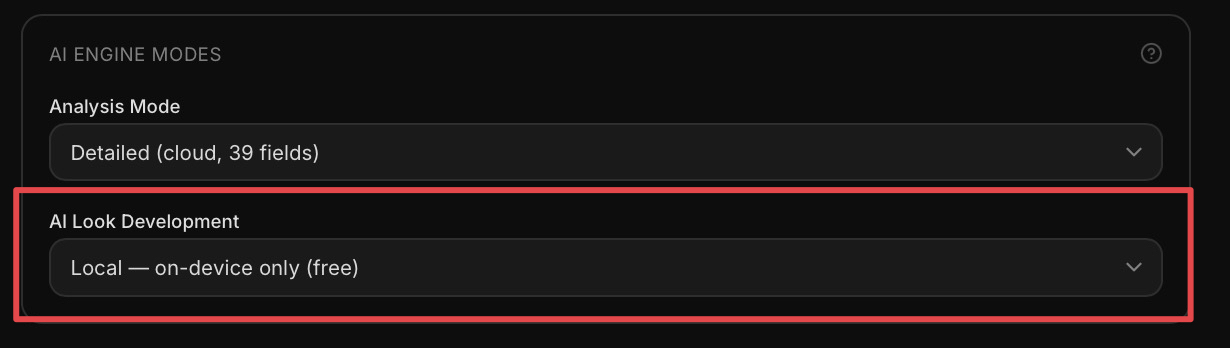
In Settings → AI Engine Settings, under AI Engine Modes → AI Look Development, you can choose between Local on Device and Extended Cloud Enhanced. The Extended Cloud Enhanced mode has a better understanding of your description of the look and can give you better results. We recommend switching to it whenever you feel you're not getting the right output from the local mode.
See Look Building (coming soon) and Intent (coming soon) for the full agentic workflow.